Running Facebook and Instagram ads without properly setting up your Meta Business Portfolio is one of the biggest mistakes business owners make.
A lot of people get excited to launch ads, choose an audience, and start spending money fast.
But if your backend setup is incomplete, messy, or missing key assets, you can run into serious problems later like:
- ad account issues
- missing access
- poor tracking
- payment failures
- weak optimization
- account confusion when hiring help
That’s why before you launch your first campaign, you need to make sure your Meta Business Portfolio is set up the right way.
In this guide, I’ll walk you through the 7 most important things you need to set up in Meta Business Portfolio before running ads, so you can avoid costly mistakes and build a stronger foundation for your campaigns.
But, maybe you are wondering what is Meta Business Portfolio? And how to set up one, you can check this one (insert the link to one of our blog post). If you’ve heard the term Meta Business Manager, that’s what many people still call it. Meta has updated the naming in recent years, but the purpose is the same.
Why This Matters Before You Spend Money on Ads
If your setup is wrong, your ads can still technically run — but that doesn’t mean they’ll run smoothly or efficiently.
Poor setup can lead to:
- broken tracking
- Rejected ads
- limited access to assets
- difficulty scaling later
- issues with pixel data
- problems when working with freelancers or agencies
- wasted ad spend because your account structure isn’t clean
In short:
The quality of your setup affects the quality of your ad performance.
So before you run ads, make sure these critical pieces are in place.
1. Your Facebook Page
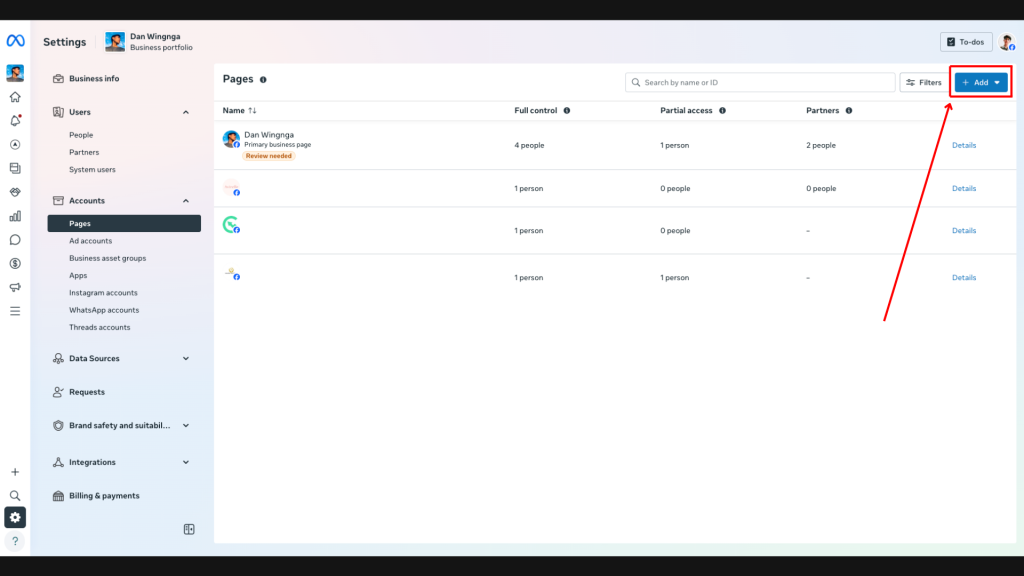
Your Facebook Page is one of the most important assets inside your Meta Business Portfolio.
Even if you mainly care about Instagram ads or just want leads, your Facebook Page still matters because it helps define your business identity inside Meta’s ecosystem.
Why it matters:
- Your ads often run under your Page identity
- It adds legitimacy and trust
- It connects to your business assets
- It helps keep your setup organized
What to check:
- Your Page is connected to the correct Meta Business Portfolio
- You actually own the Page (not just partial access)
- It’s the active, current version of your business Page
- It’s not a duplicate or outdated Page
Common mistake:
A lot of business owners accidentally connect the wrong Page or leave the Page under someone else’s control.
That becomes a headache later.
2. Your Instagram Account
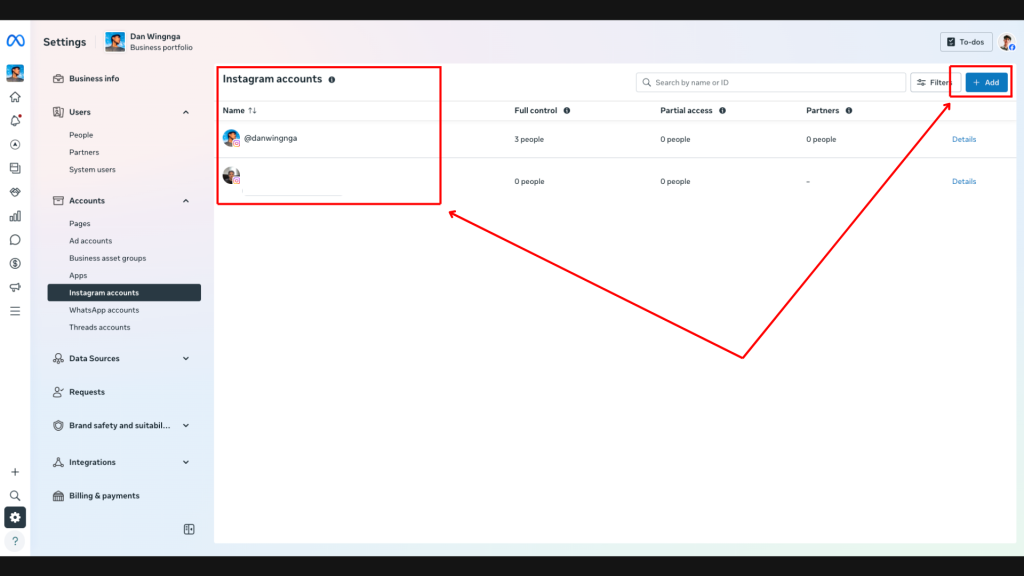
If you want to run ads on Instagram, your Instagram account should be connected inside your Meta Business Portfolio.
This step is often skipped by beginners, but it matters more than people realize.
Why it matters:
- Allows Instagram ad placements
- Lets your ads show under the correct Instagram identity
- Keeps your branding consistent across Facebook and Instagram
- Improves trust and professionalism
What to check:
- Your Instagram account is connected to the correct business setup
- It’s the official brand account
- Login access is current
- It’s properly linked inside Business Settings
Common mistake:
People run ads from a Facebook Page only and forget to connect Instagram, then later wonder why their ads don’t look right across placements.
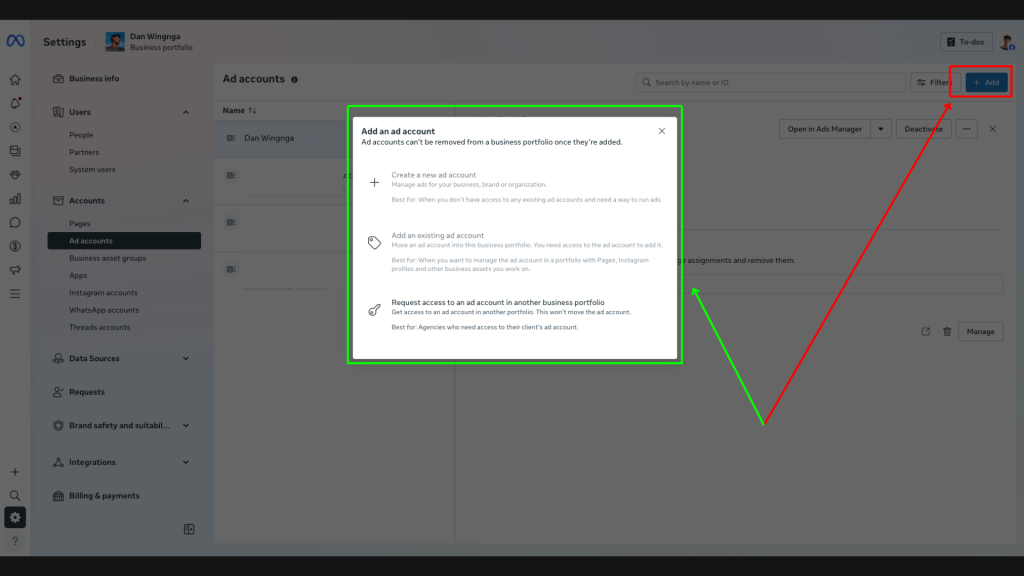
3. Your Ad Account
Your ad account is where all your campaigns live.
This is one of the most important parts of your Meta Business Portfolio because if your ad account is created incorrectly, it can create long-term issues.
Why it matters:
- This is where your campaigns, ad sets, and ads are managed
- It controls billing structure
- It determines your time zone and currency
- It’s essential for proper campaign management
What to check:
- You have the correct ad account connected
- You own it or have the correct access level
- The time zone is correct
- The currency is correct
- It’s under the right business structure
Very important:
Once you create an ad account, the time zone and currency usually can’t be changed.
That’s why this setup step matters so much.
Common mistake:
Creating an ad account too fast with the wrong currency or wrong business structure.
4. Your Payment Method
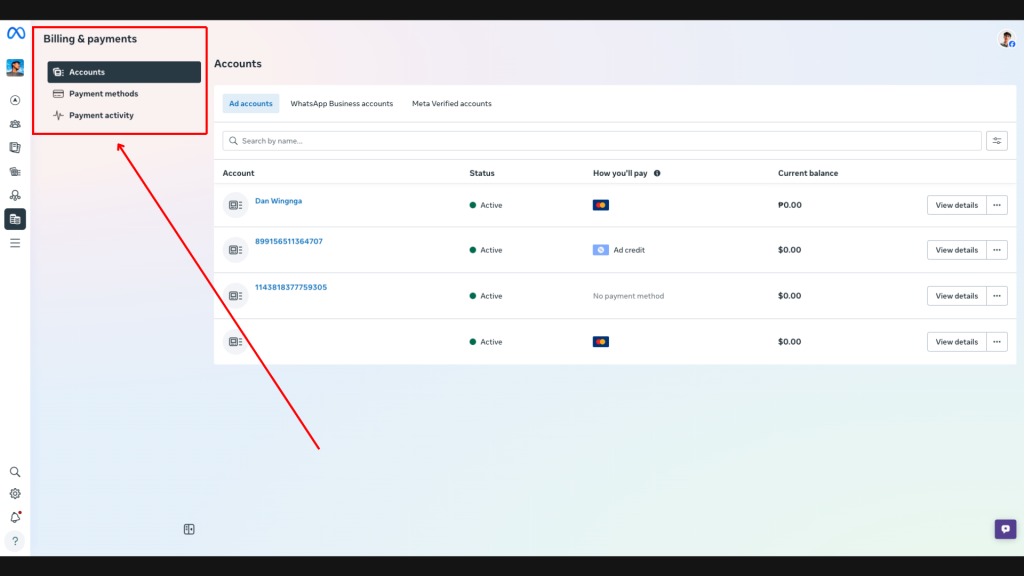
You can have a perfect campaign ready to go, but if your payment method isn’t properly set up, your ads won’t deliver.
This sounds simple, but it’s one of the most common issues I see.
Why it matters:
- Ads won’t run without valid billing
- Failed payments can stop campaigns
- Billing issues can disrupt scaling
- It affects account reliability
What to check:
- Your payment method is active
- The card or billing source works for online payments
- Billing info is updated
- There are no old failed payment issues on the account
Common mistake:
People set everything up, launch the campaign, and then wonder why delivery is limited or stopped — when it’s just a billing problem.
5. Your Meta Pixel
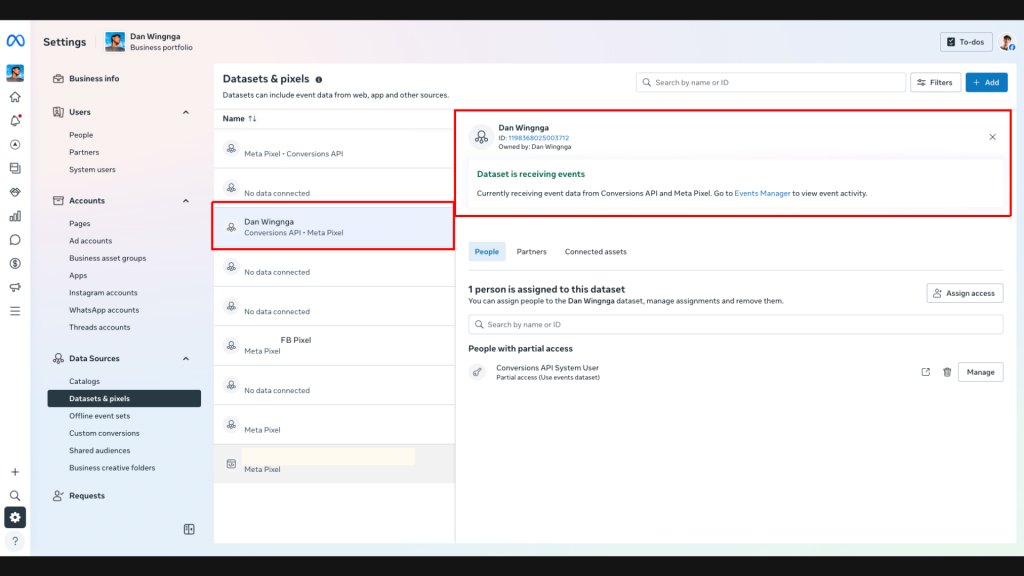
If you’re sending traffic to a website, landing page, product page, or checkout page, your Meta Pixel is absolutely essential.
This is one of the biggest setup priorities before running ads.
Why it matters:
- Tracks important website actions
- Helps Meta optimize for conversions
- Improves retargeting
- Gives you better campaign data
- Helps you scale smarter over time
What to check:
- Your Pixel is created
- It’s connected to the correct ad account or business setup
- It’s installed on your website
- Key events are firing properly (like leads, add to cart, purchase, etc.)
Common mistake:
Launching ads without a properly installed Pixel and then trying to optimize blind.
That usually leads to weaker performance and poor decision-making.
6. People, Partners, and Permissions
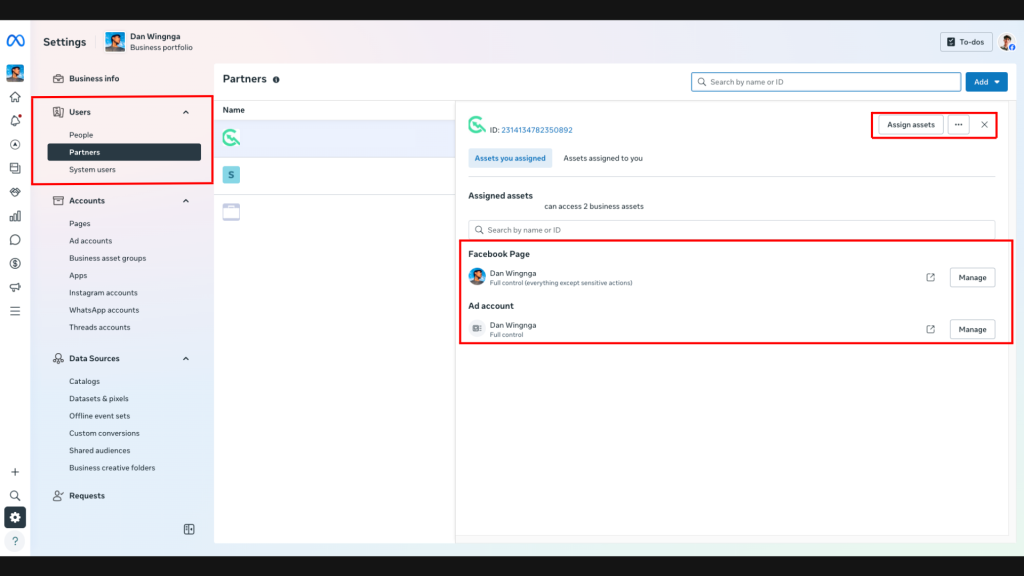
If you ever plan to work with a media buyer, VA, team member, or agency, your permissions need to be set up correctly.
This is where many businesses create unnecessary risk.
Why it matters:
- Keeps your assets secure
- Lets you collaborate professionally
- Avoids sharing personal logins
- Prevents accidental loss of access
- Makes scaling easier when building a team
What to check:
- You are the main admin (or the correct decision-maker has admin access)
- Team members have only the permissions they need
- Partners are added correctly
- No unnecessary people have full admin access
Best practice:
Never share your personal Facebook login.
Always grant access through People or Partners inside Meta Business Settings.
Common mistake:
Giving everyone admin access or sharing credentials manually.
That can create security and ownership problems later.
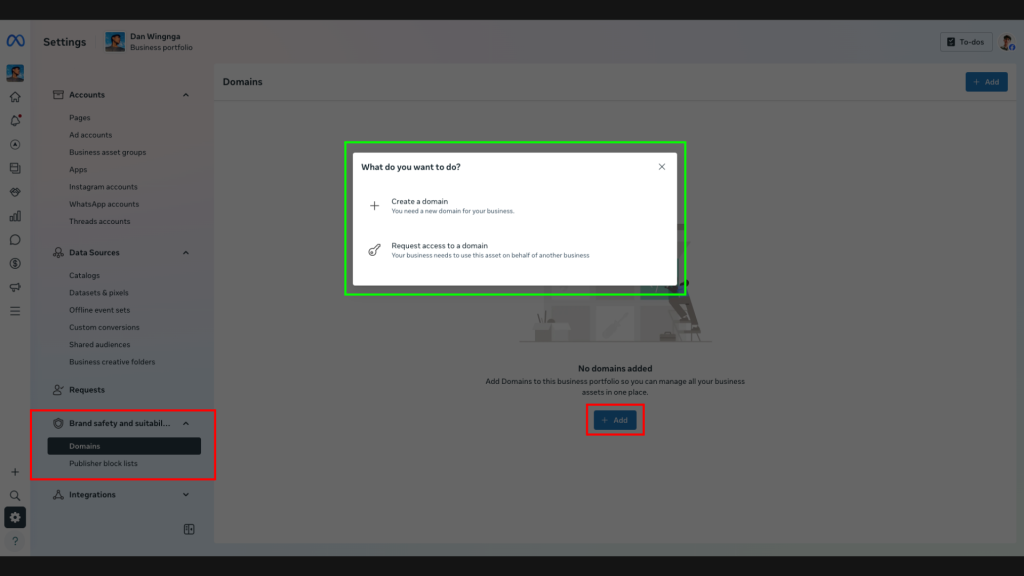
7. Domain Verification and Overall Business Setup
If you’re running website-based campaigns, your domain setup matters more than most beginners realize.
Domain verification and clean business settings help create a stronger, more reliable ad environment.
Why it matters:
- Helps with website event management
- Supports better tracking setup
- Makes your business structure more professional
- Helps reduce avoidable setup issues
- Creates a cleaner foundation for website conversion campaigns
What to check:
- Your domain is verified (if applicable)
- Your website is connected to the right business assets
- Your business info is accurate
- Your website and pixel setup align correctly
Common mistake:
Running traffic or conversion campaigns without verifying important website-related assets.
That can create unnecessary complications later when managing events and tracking.
Quick Pre-Launch Checklist
Before you run your first Meta ad, make sure these 7 things are set up:
- Facebook Page
- Instagram account
- Ad account
- Payment method
- Meta Pixel
- People / partner permissions
- Domain verification / business setup
If these are in place, your campaigns will have a much stronger foundation.
Why This Setup Matters More Than Most People Think
A lot of business owners focus only on:
- ad creative
- targeting
- budget
- offer
And yes, those things matter.
But if the backend setup is weak, you can still lose money even with a good ad strategy.
That’s because bad setup can cause:
- poor data collection
- incomplete tracking
- delivery interruptions
- limited access
- account confusion
- scaling issues later
A clean Meta Business Portfolio setup gives your campaigns the best chance to perform
Final Thoughts
If you want to run Facebook and Instagram ads the right way, your Meta Business Portfolio can’t be an afterthought.
Before you launch anything, make sure the essentials are in place.
This might feel like “backend stuff,” but it has a direct impact on how smoothly your ads run and how easy it is to scale later.
If you want better performance, fewer headaches, and a more professional ad setup, start here.
Build the foundation before you buy the traffic.
Need Help Setting Up Your Meta Business Portfolio Before Running Ads?
If you want help making sure everything is set up correctly before you spend money on ads, I can help.
A clean backend setup can save you time, avoid costly mistakes, and make your campaigns much easier to optimize and scale.👉 If you want expert help with your Meta Ads setup and strategy, feel free to reach out